

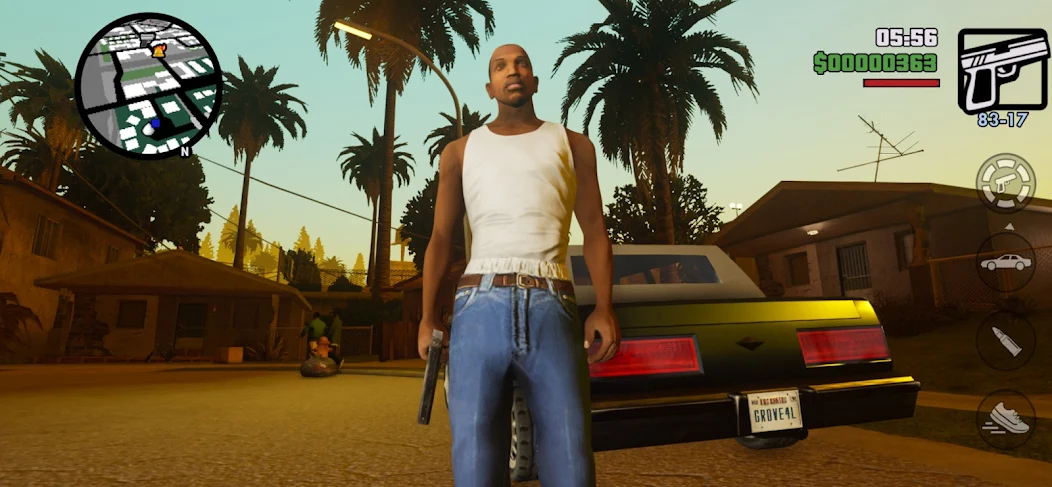
Overview of GTA SA Ultra Graphics Mod
GTA SA Ultra Graphics MOD APK elevates the visual fidelity of Grand Theft Auto: San Andreas on mobile devices to console and PC remastered standards. Powered by custom SA DirectX 2.0 ENB Shaders, 4K HD texture replacements, and enhanced lighting engine parameters, this modification transforms Los Santos, San Fierro, and Las Venturas into a modern visual powerhouse.
Designed specifically for mobile gaming enthusiasts and high-spec smartphone users, this graphics overhaul delivers realistic water physics, dynamic volumetric clouds, screen-space reflections (SSR), and ultra-detailed vehicle models.
Enhanced Visual & Audio Features
- SA DirectX 2.0 Shader Engine: Real-time atmospheric lighting, lens flare, dynamic bloom, and ambient occlusion.
- Realistic Water & Reflection Physics: High-definition water body textures with reflective wave dynamics.
- 4K Environment & Vehicle Textures: Sharper road pavements, realistic foliage, high-poly cars, and HD weapon models.
- Dynamic Weather & Timecyc Overhaul: Dramatic sunsets, foggy mornings, realistic rain droplets, and night lighting enhancements.
- 60 FPS Unlocked Performance: Optimized frame rates for devices with high-refresh-rate displays.
- Built-in CLEO Mod Menu: Change weather conditions, time of day, and graphic intensity on the fly.
Recommended System Requirements
To experience GTA SA Ultra Graphics Mod at a stable 60 FPS, your mobile device should meet the following technical requirements:
- OS: Android 9.0 (Pie) or higher
- RAM: 4GB or 6GB RAM recommended
- Processor: Qualcomm Snapdragon 778G / 870 / 8 Gen 1, MediaTek Dimensity 8100+, or equivalent
- Storage: At least 4GB of free internal memory
Installation Instructions for Ultra Graphics Mod
- Download the GTA SA Ultra HD APK + Full OBB Pack and the SA DirectX 2.0 Shader Pack.
- Install the APK file on your smartphone.
- Extract the main OBB files to
Internal Storage/Android/obb/com.rockstargames.gtasa/. - Extract the SA DirectX 2.0 Shader pack and copy all shader files into
Internal Storage/Android/data/com.rockstargames.gtasa/files/. - Launch the game, open Video Settings, set Visual Effects to MAX, and experience next-gen GTA SA graphics!



















No comments yet. Be the first!
Loading comments…