
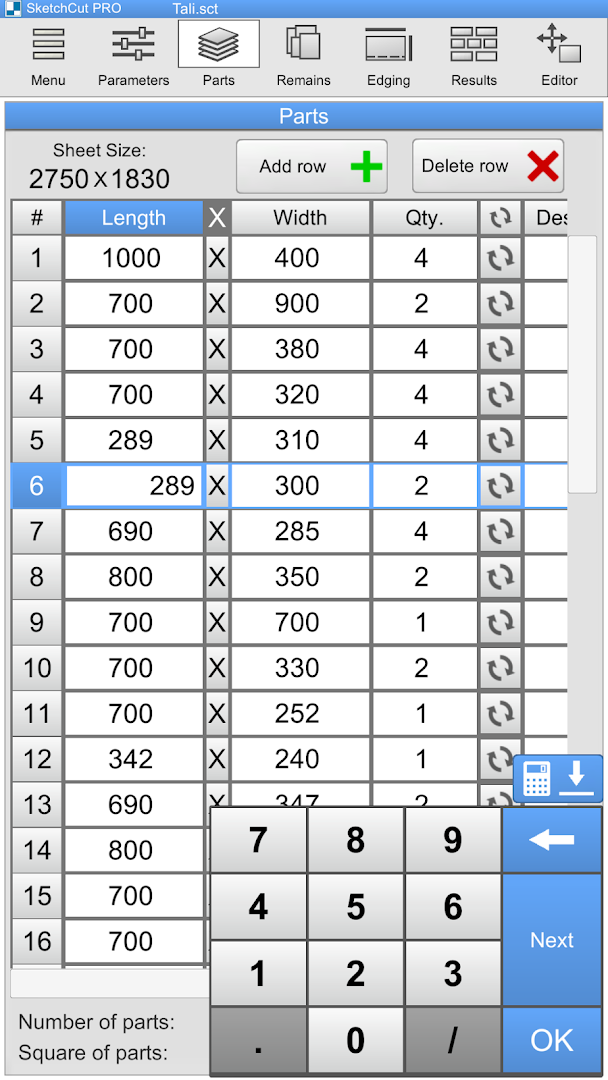
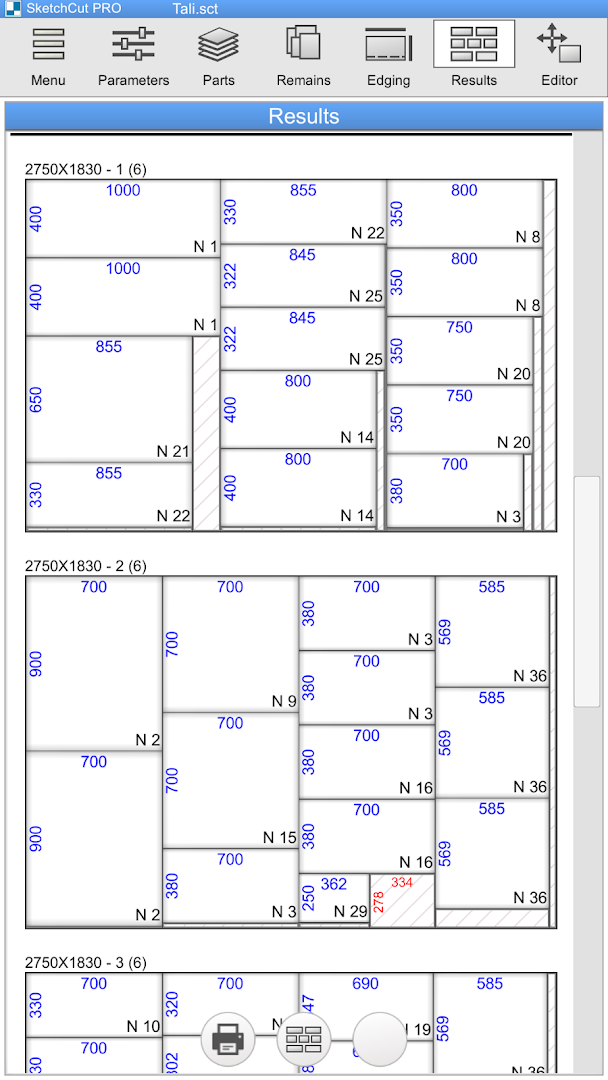
For carpenters, furniture manufacturers, glass fabricators, metalworkers, and DIY enthusiasts, SketchCut PRO APK for Android (v4.2.1) represents the gold standard in mobile sheet material cutting layout optimization. Developed by Fortali (TaLi Software Arm), this indispensable professional utility transforms complex 2D cutting calculations into automated, scrap-minimizing cutting maps in seconds. By calculating blade kerf thicknesses, trim margins, wood grain directions, and edge banding lengths, SketchCut PRO helps workshops save thousands of dollars in raw sheet material costs.
Maximize Material Yield and Eliminate Workshop Scrap Waste
In modern woodworking and industrial sheet manufacturing, maximizing the usable yield of plywood, MDF, acrylic, and sheet metal is essential for maintaining project profitability. SketchCut PRO replaces tedious manual hand-drafting with high-speed computational optimization algorithms. Simply input the dimensions of your standard raw sheets, list your required project parts, define blade saw kerf thicknesses, and let SketchCut PRO generate flawless cutting maps that push material utilization rates above 95%.
Core Features of SketchCut PRO APK for Android
1. High-Precision 2D Cutting Optimization Engine
Harness advanced nesting mathematics directly on your smartphone:
- Ultra-High Material Efficiency: Automatically reorganizes component parts to minimize off-cut scrap and reduce raw sheet consumption.
- Multi-Sheet Batch Calculations: Calculate large-scale furniture orders across dozens of identical or mixed raw sheet sizes simultaneously.
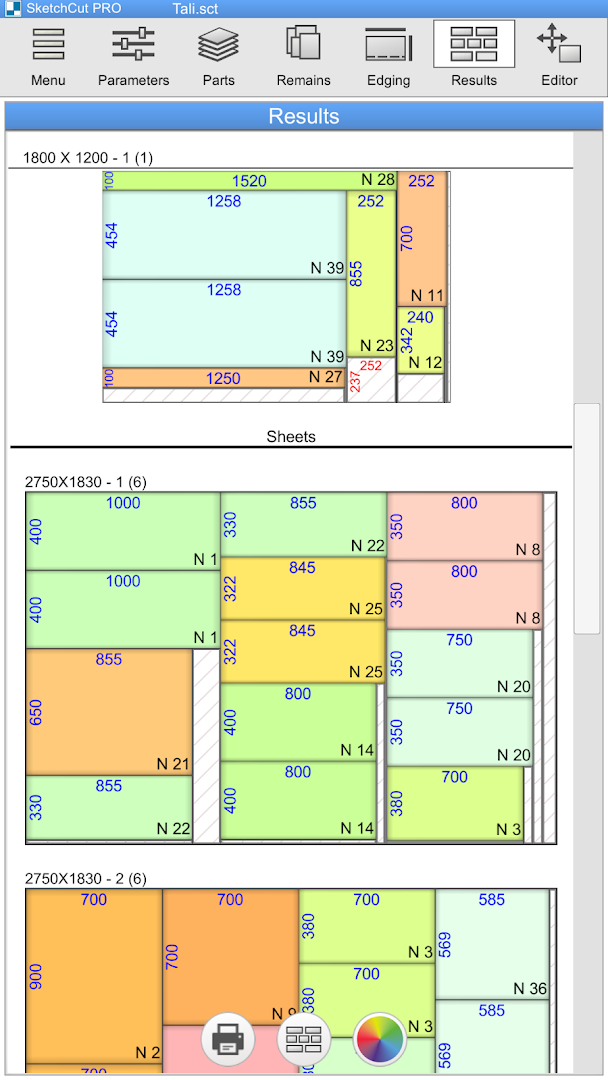
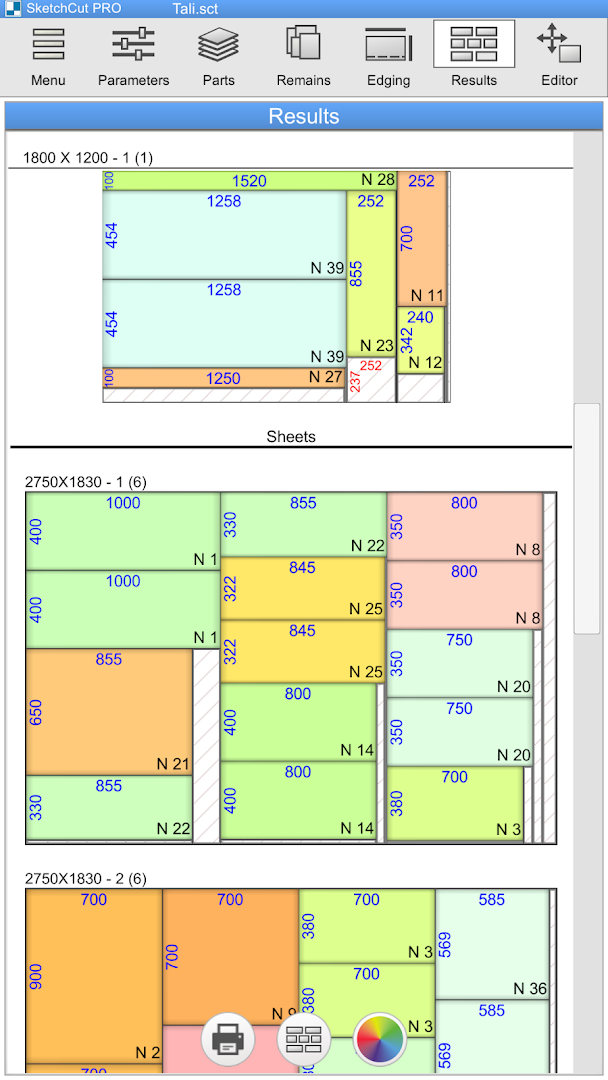
- Immediate Visual Feedback: Preview high-contrast graphical cutting diagrams with colored part borders and clear dimensional measurements.
2. Dual Cutting Method Modes: Guillotine & Nested Routing
Tailored specifically to your workshop’s machining setup:
- Guillotine Cutting Mode: Generates straight-through rip and cross cuts from sheet edge to edge, tailored for sliding table saws, beam saws, and manual panel saws.
- Nested CNC Mode: Computes interlocking geometric part placements optimized for 3-axis CNC router milling tables.
3. Wood Grain Direction & Orientation Control
Preserve premium visual aesthetics across architectural furniture projects:
- Grain-Aligned Locking: Enforce strict horizontal or vertical grain orientation constraints for natural hardwood veneer and laminated panels.
- Part Rotation Freedom: Allow non-grain components (such as interior cabinet dividers and sub-shelves) to rotate freely 90 degrees for tighter packing.
4. Comprehensive Saw Kerf & Sheet Edge Trimming
Factor in real-world fabrication tolerances:
- Adjustable Saw Blade Kerf: Set exact saw blade thickness offsets (e.g., 3.2 mm) to guarantee cut pieces match finished dimensions precisely.
- Perimeter Edge Trimming: Specify perimeter trim margins (e.g., 10 mm) to remove chipped or damaged sheet corners before processing parts.
5. Edge Banding Calculation & Material Cost Estimating
Streamline project bidding and material procurement:
- 4-Sided Edge Banding Toggles: Mark individual component edges (Left, Right, Top, Bottom) for PVC/melamine edge tape and calculate total linear meters required.
- Integrated Cost Breakdown: Input square-meter raw material prices and hourly labor rates to generate instant client project quotes.
6. Professional PDF & CSV Blueprint Exports
Share readable cutting plans with shop-floor technicians:
- High-Resolution PDF Reports: Export printable multi-page cutting maps complete with part labels, cut sequence numbers, and scrap percentages.
- CSV / Excel Data Export: Import part cut lists from spreadsheets or export final cut orders to external ERP inventory software.
7. Reusable Remnant Scrap Inventory Management
Never let usable off-cuts go to waste:
- Remnant Tracking Library: Automatically save large off-cut sheet remnants into your digital stock inventory for future projects.
- Priority Remnant Utilization: Choose to consume smaller existing scrap sheets before cutting into fresh full-sized raw panels.
8. 100% Offline Standalone Workshop Operation
Designed for noisy, remote workshop environments with zero connectivity:
- No Internet Required: All optimization algorithms, project databases, and PDF rendering engines function 100% offline.
- Ultra-Lightweight 18 MB Footprint: Installs instantly, launches with zero loading delays, and uses minimal device battery.
8. Multi-Unit Measurement Support (Metric & Imperial Fractional)
Adapt to international workshop manufacturing standards seamlessly:
- Metric Millimeters (mm) & Centimeters (cm): Standard precision measurement modes for European, Asian, and global cabinetmaking industries.
- Imperial Fractional Inches (1/16", 1/32", 1/64"): Native support for North American architectural woodworking standards without cumbersome manual decimal conversions.
- One-Tap Unit Toggle: Instantly convert entire active cutting project lists between metric and fractional imperial units.
9. Saw Blade Deflection & High-RPM Kerf Compensation
Ensure micrometric precision across heavy industrial cutting machinery:
- Tungsten Carbide Kerf Calibration: Account for specific blade tooth profiles (Triple Chip Grind vs. Alternate Top Bevel) to prevent cumulative dimensional creep.
- Scoring Blade Alignment: Factor in dual-blade panel saw scoring configurations to eliminate chip-out on double-sided melamine panels.
Pro Tips for Getting the Most Out of SketchCut PRO
- Always Account for Sheet Edge Trimming: Commercial sheet goods often suffer from dented edges during transit; setting a 10 mm edge trim prevents damaged corners from ruining finished cabinet faces.
- Set Grain Constraints Selectively: Only lock the grain direction on visible drawer fronts and cabinet doors; allowing interior dividers to rotate can reduce the total sheets required by 15-20%!
- Input Accurate Saw Blade Kerf: Measuring your table saw blade teeth with digital calipers and setting the exact kerf (typically 3.0 to 3.2 mm) eliminates cumulative dimensional drift across multiple cuts.
- Use Guillotine Cuts for Manual Saws: If you are operating a manual panel saw, always keep Guillotine mode enabled to ensure your cuts remain continuous straight lines from edge to edge.
- Print PDF Blueprints for Shop-Floor Assembly: Attaching printed cutting sequence maps to your workshop clipboards helps saw operators cut rapidly without confusing part labels.
How to Download, Install, and Use SketchCut PRO on Android
- Download the Official APK: Tap the secure download button above to retrieve the verified
SketchCut PRO v4.2.1.apkpackage (18 MB). - Enable Unknown Sources: Go to Settings > Security > Install Unknown Apps and allow permission for your browser.
- Install the Application: Open your Downloads folder, tap the APK installer, and click Install.
- Optimize Your First Cut: Launch SketchCut PRO, enter your sheet and part dimensions, and generate instant professional cutting blueprints today!
Conclusion
SketchCut PRO APK for Android is an indispensable productivity powerhouse for any workshop cutting wood, glass, acrylic, plastic, or sheet metal. With its cutting-edge 2D nesting optimization engine, dual cutting methods (Guillotine & CNC), grain direction management, edge banding calculations, PDF blueprint exports, and complete offline capability inside a tiny 18 MB download, it pays for itself on day one. Download the official latest version today and maximize your workshop efficiency with SketchCut PRO!















No comments yet. Be the first!
Loading comments…