


X8 Sandbox MOD APK is one of the most powerful and versatile virtual machine (VM) utilities available for Android mobile devices. Designed specifically for gamers, power users, and developers, X8 Sandbox enables you to run an entirely isolated, virtualized Android operating system right inside your primary smartphone. Whether you want to manage dual accounts, utilize root-exclusive tools like GameGuardian and Xposed Framework, or speed up tedious in-game tasks with the built-in Speeder engine, X8 Sandbox provides a comprehensive solution—all without requiring root access on your physical device.
Key Features of X8 Sandbox MOD APK
X8 Sandbox packs an impressive array of advanced features that elevate mobile gaming and multitasking to an entirely new level. Here is what makes this application an essential tool for Android enthusiasts:
1. Virtual Machine (VM) Architecture
X8 Sandbox creates a completely independent Android environment inside your phone. Any app or game installed inside the sandbox operates separately from your primary system storage and OS settings. This ensures safe testing, complete isolation, and smooth execution without risking system instability on your main device.
2. Built-in Self-Root & Xposed Framework
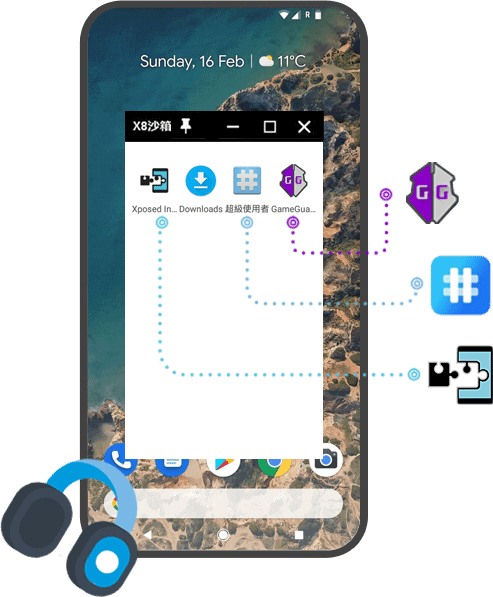
One of the largest hurdles for Android modding is system root requirements. X8 Sandbox solves this problem by offering a one-tap Self-Root toggle directly within the virtual environment. You can freely run root-dependent applications such as GameGuardian, Titanium Backup, or Xposed modules inside the sandbox, while keeping your main phone 100% unrooted, secure, and compatible with banking apps.
3. Integrated Speeder Engine (Speed Hack)
For players who enjoy idle games, RPGs, or simulation games like Bus Simulator Indonesia (BUSSID) or Higgs Domino, the built-in X8 Speeder allows you to accelerate or decelerate game clock speeds. You can easily skip lengthy waiting times, speed up farming loops, or slow down fast-paced action games for precision gameplay.
4. Picture-in-Picture (PIP) Floating Mode
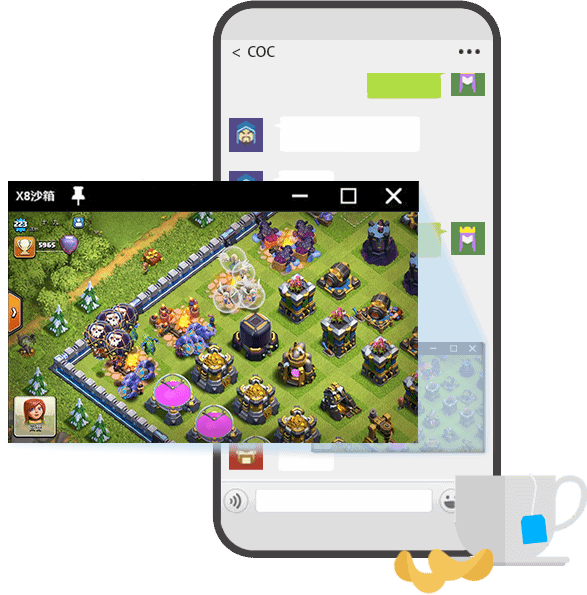
Multitasking becomes effortless with PIP support. X8 Sandbox allows you to run games or applications in a floating resizable window. You can continue playing or auto-farming your favorite game in a small overlay window while simultaneously browsing social media, chatting on messaging apps, or watching YouTube videos.
5. Seamless Dual Account (Multi-Instance) Operation
Running two instances of the same game or social media account usually requires clunky account switching or heavy third-party cloners. With X8 Sandbox, you can keep your primary account active on your phone while running a secondary alt account inside the sandbox. Both accounts can operate simultaneously without logging out or interfering with each other.
6. VIP Unlocked & Ad-Free Experience
The standard version of X8 Sandbox often features frequent pop-up ads and restricted VIP settings. The X8 Sandbox MOD APK provided here comes with VIP Unlocked privileges, removing all advertisement interruptions, unlocking high refresh rate settings, and granting unrestricted access to all premium VM options.
System Requirements & Compatibility Notes
- Supported Architecture: 64-bit (arm64-v8a) & 32-bit (armeabi-v7a) compatibility.
- Android OS Version: Android 5.1 and higher (Optimized for Android 10, 11, 12, 13, 14).
- RAM Requirement: Recommended 3 GB RAM or higher for smooth VM virtualization.
- Storage Space: At least 1.5 GB of free internal storage for installing the sandbox image and virtual apps.
How to Download and Install X8 Sandbox MOD APK
- Download the File: Click the verified download link above to get the
X8 Sandbox MOD APK 0.7.6.2.09-64gppackage. - Enable Unknown Sources: Go to your phone's Settings > Security > Install Unknown Apps and grant permission to your browser or file manager.
- Install the APK: Open your Download manager, tap the downloaded APK file, and follow the on-screen prompts to complete installation.
- Launch & Configure: Open X8 Sandbox. Grant necessary storage and display overlay permissions. Once inside the VM home screen, tap the Add App button to import games or tools into the sandbox.
- Activate Speeder or Root: Access the X8 Sandbox settings menu inside the VM to toggle Self-Root or configure Speeder speed hack controls as desired.
Frequently Asked Questions (FAQ)
Check out our structured FAQ section below for quick answers regarding safety, updates, and performance troubleshooting for X8 Sandbox.















No comments yet. Be the first!
Loading comments…